How Much Does MDM Software Cost? A Pricing Guide
Most MDM software costs $2–$15 per device, per month — but the number that actually lands on your invoice depends on feature tier, support level, and fleet size. Here's exactly what determines the price.
If you've started shopping for mobile device management software, you've probably already seen the answer that doesn't help: "it depends." It's true, but it's not useless — the price of MDM software depends on a short, predictable list of factors, and once you know what they are, you can estimate your own cost within a few minutes rather than waiting on a sales call.
What Determines the Price of MDM Software
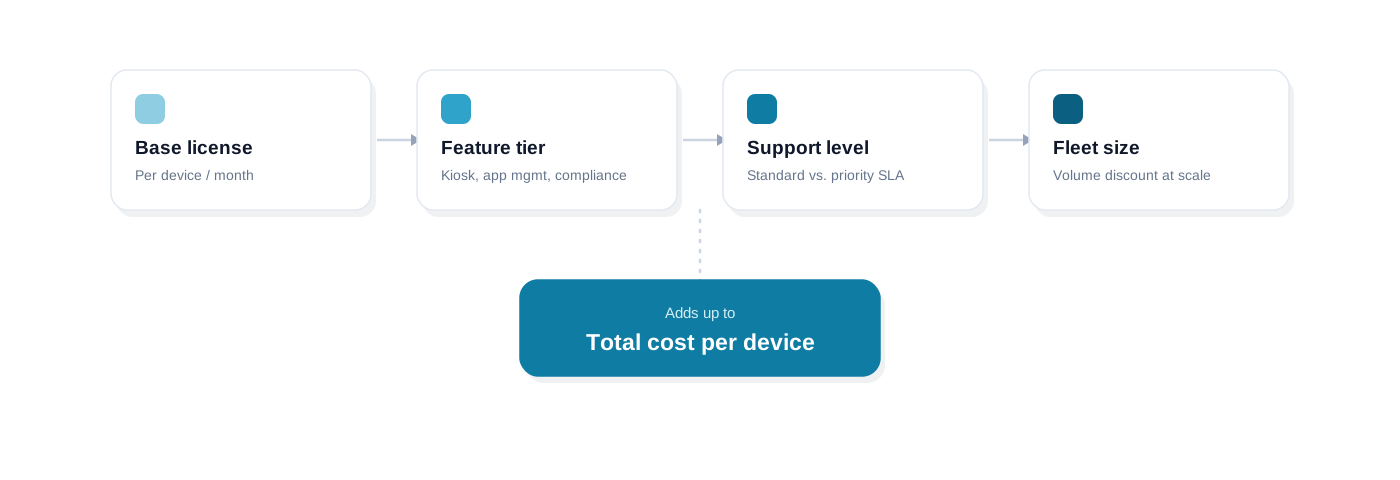
The sticker price you're quoted is really the sum of four independent variables. Change any one of them and the number moves — which is exactly why two companies with the same device count can pay very different amounts.
Base license
The floor price for enrollment and basic policy enforcement — Wi-Fi configs, password rules, remote lock. Every vendor's cheapest tier starts here.
Feature tier
Kiosk mode, silent app deployment, content whitelisting, and compliance reporting are usually gated behind a higher tier — or sold as paid add-ons.
Support level
Standard (ticket/email) support is typically included; priority support with a response-time SLA usually costs more.
Fleet size
Volume discounts are common past roughly 50 devices, and annual billing is usually cheaper per-month than paying monthly.
The mistake most buyers make is comparing the headline per-device price across vendors without checking whether it includes the same feature set. A $3/device quote that doesn't include kiosk mode isn't cheaper than an $8/device quote that does — it's just missing the feature you actually need, and you'll pay for it later as an add-on.
Typical MDM Pricing Tiers
Most vendors structure pricing in three rough bands. The exact numbers vary, but the shape of the pricing ladder is consistent across the market:
| What's typically included | Typical price per device/month | |
|---|---|---|
| Basic / entry tier | Enrollment, policy enforcement, basic restrictions, remote lock | $2–$4 |
| Business / standard tier | + App management, kiosk mode, compliance reporting | $4–$8 |
| Enterprise / premium tier | + Priority support, advanced compliance, dedicated onboarding | $8–$15+ |
If your fleet includes any shared, public-facing, or single-purpose devices — a self-checkout tablet, a delivery driver's handheld — kiosk mode isn't optional, so pricing yourself into the basic tier to save a couple of dollars a device usually backfires. The same logic applies if app deployment is the deciding factor: check whether app management — silent installs, whitelisting, a private app store — is included standard or sold as a separate module, before you compare two vendors' entry-tier prices directly.
Per-Device vs. Per-User vs. Flat-Rate Pricing
The billing model, not just the price, changes what you actually pay at your specific device-to-user ratio.
| How it works | Best for | |
|---|---|---|
| Per-device | Billed for every enrolled device, regardless of who uses it | Shared/kiosk fleets, or multiple devices per employee |
| Per-user | Billed per employee, covering every device that person enrolls | BYOD-heavy fleets where people carry 2+ devices |
| Flat-rate / tiered bands | A fixed fee per device-count band (e.g. 1–50, 51–200 devices) | Predictable budgeting at a stable, known fleet size |
Run the math both ways before you sign anything: if you have 100 employees enrolling 140 devices total, per-user pricing on 100 users very likely beats per-device pricing on 140 devices — but if 80 of those devices are shared kiosk tablets with no single "user," per-device pricing is usually the only model that makes sense in the first place.
Hidden Costs to Watch For
The number in the pricing table is rarely the number you actually pay. Before you sign, ask specifically about each of these:
- Onboarding or setup fees — a one-time charge some vendors add on top of the subscription.
- Minimum seat commitments — a floor price even if your pilot only needs five devices.
- Paid add-ons for kiosk mode, remote wipe, or app management on platforms that don't include them standard.
- A support-tier upcharge for anything beyond basic email/ticket support.
- Overage fees if your device count crosses a tier boundary mid-contract.
Free MDM Options: Do They Actually Work?
Android's own built-in tools — Family Link, a bare Google Workspace mobile policy — can enforce a password rule or a basic restriction, but they stop well short of fleet management: no kiosk mode, no silent app deployment at scale, no compliance dashboard. They're fine for a handful of personal devices, not for a business fleet.
Most commercial MDM platforms offer a free trial rather than a genuinely free tier — usually time-limited (a week to a month) rather than capped at a tiny device count, so you can test the real feature set before paying anything. That's a meaningfully different offer than a permanently free plan, and it's worth confirming which one you're actually being offered.
How to Budget for MDM at Your Fleet Size
- 1
Under 50 devices
Expect to pay close to list price with limited negotiating leverage — focus your evaluation on getting the right feature tier rather than chasing a discount.
- 2
50–500 devices
This is where volume discounts typically start. Ask directly, even if the pricing page doesn't advertise a break at this size — most vendors have one.
- 3
500+ devices
Negotiate a custom contract rather than accepting published tier pricing, and push for an annual commitment discount plus a named support contact.
Whatever your size, requesting an itemized quote — base license, feature tier, support level, all called out separately — makes it far easier to compare vendors apples-to-apples than working from a single blended number. For the broader evaluation criteria beyond price alone, see how to evaluate and choose the best MDM software, and if you're still deciding how much platform you actually need, MDM vs. EMM vs. UEM explains how scope — not just brand — drives a lot of the price difference.
Where LimaxLock Fits
LimaxLock uses simple, per-device pricing with kiosk mode (single- and multi-app), silent app deployment, and remote lock/wipe included standard in every plan — not gated behind an enterprise tier or sold as a separate add-on. Every plan starts with a 14-day free trial, no credit card required, so you can enroll real devices and price your actual fleet before committing to anything. If you're still mapping out what you need before comparing numbers, what is mobile device management is the right starting point.
Frequently Asked Questions
Most MDM platforms price per enrolled device per month, typically in the $2–$15 range. Basic policy enforcement sits at the low end; kiosk mode, app management, and compliance reporting push you toward the middle and high end. Annual billing and volume discounts are common for fleets over 50 devices.